
For most individuals, AI nonetheless looks like one thing you open deliberately.
You go to a web site, paste textual content, ask a query, then return to what you had been doing. That mannequin labored at first, however it’s already beginning to really feel outdated.
The actual shift taking place now just isn’t “AI as an app.” It’s AI embedded instantly into the instruments you already use every single day. And essentially the most missed of these instruments is your internet browser.
Take into consideration the place your time truly goes. Studying articles. Reviewing paperwork. Evaluating choices. Researching concepts. Leaping between tabs. The issue just isn’t a lack of knowledge. It’s an excessive amount of data, unfold throughout too many tabs, with too little time to course of it nicely.
An AI-powered browser adjustments this dynamic. As a substitute of copying and pasting textual content into one other software, the AI works alongside you as you browse. It may well summarize what you might be studying, clarify dense language, and make it easier to flip data into one thing usable with out ever leaving the web page.
On this article, we are going to break down what AI-powered internet browsers truly are, the way to set up and use them, and which choices have a tendency to suit totally different working types greatest.
Disclaimer: Whereas these are common options, it is vital to conduct thorough analysis and due diligence when deciding on AI instruments. We don’t endorse or promote any particular AI instruments talked about right here. This text is for academic and informational functions solely. It isn’t supposed to supply authorized, monetary, or scientific recommendation. At all times adjust to HIPAA and institutional insurance policies. For any selections that impression affected person care or funds, seek the advice of a professional skilled.
It’s not simply the talks. Or the audio system. Or the methods.
PIMDCON, the #1 Actual Property & Entrepreneurship Convention for Physicians, works due to what occurs between the classes.
The conversations. The readability. The shift.
LEARN MORE ABOUT PIMDCON
What Is an AI-Powered Net Browser?
Conventional browsers vs. AI-powered browsers
A conventional browser does one job nicely: it shows data. You open a web page, learn it, and determine what to do subsequent. All interpretation, synthesis, and motion occurs in your head or in one other software.
An AI-powered browser provides a second layer. It doesn’t simply present data. It helps you perceive it and act on it if you are nonetheless studying. The browser turns into an assistant, not only a window.
This shift mirrors what number of physicians are beginning to consider AI normally, not as a alternative, however as a assist layer that improves workflow and decision-making, much like how groups are studying to construct an AI-enabled workforce in your observe.
What “AI contained in the browser” truly means
This doesn’t require technical data to make use of. In sensible phrases, AI contained in the browser can learn the web page with you. It may well summarize lengthy articles, clarify complicated language in easier phrases, and assist flip what you might be studying into notes, emails, or motion steps.
The important thing distinction from instruments like ChatGPT is context. You don’t depart the web page. The AI reacts to what’s already in your display and works with that data instantly.
It is the identical precept behind utilizing AI to cut back cognitive load and reclaim time, very like the productiveness positive factors mentioned in how physicians can save 10 hours per week with AI.
Microsoft Edge with Copilot
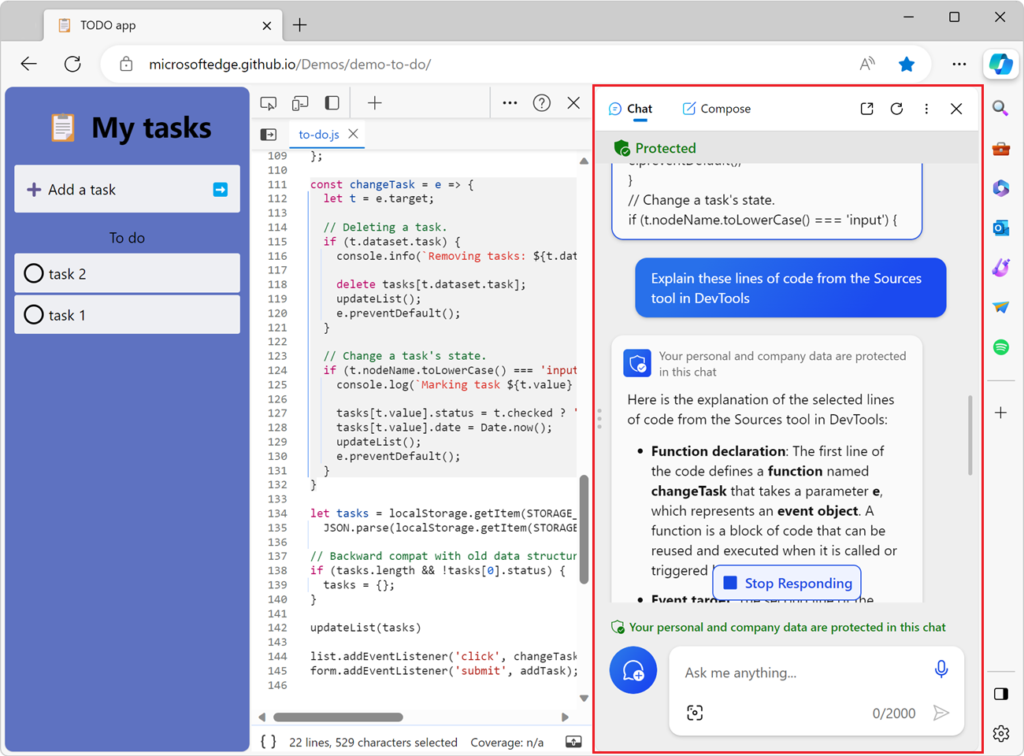
Microsoft Edge is a regular internet browser with Copilot constructed instantly right into a sidebar. The objective is easy: make it easier to perceive and use what you might be studying on-line with out switching instruments.
How one can set up and use it
Set up is easy. You obtain Edge from Microsoft’s web site and set up it like some other browser on Home windows or Mac.
To make use of Copilot, open any webpage and click on the Copilot icon within the sidebar. You may ask easy questions in regards to the content material on the web page, request a abstract, or ask for clarification on particular sections.
Used thoughtfully, this type of AI assist aligns with broader steering on how physicians can spot dangerous AI instruments and give attention to what genuinely improves readability relatively than provides noise.
Edge and Copilot are free to make use of for on a regular basis looking. There are non-compulsory paid Copilot plans, however they aren’t required for many sensible use instances.
Actual-world use instances
- Summarizing information articles with out studying each phrase
- Evaluating services or products shortly
- Translating or simplifying complicated language
- Turning articles into notes or briefs
- Drafting emails primarily based on webpage content material
- Rushing up market or competitor analysis
Arc Browser
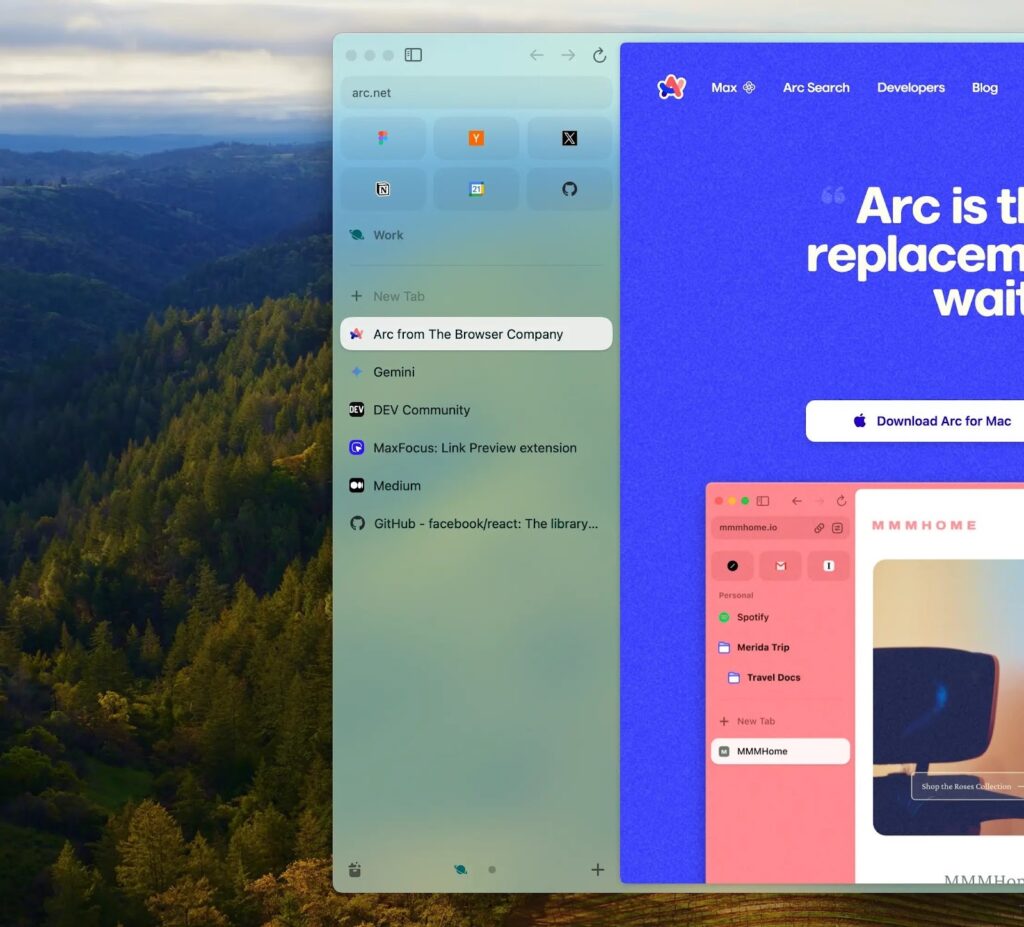
Arc Browser is a redesigned browser centered on group, focus, and lowering psychological muddle. AI is current, however it works quietly within the background to maintain issues clear and manageable relatively than consistently prompting you.
How one can set up and use it
You may obtain Arc from arc.web. It’s out there on each Mac and Home windows.
Arc organizes tabs vertically in a sidebar as a substitute of throughout the highest. Pages will be summarized immediately, and “Areas” permit you to separate totally different areas of life and work so all the pieces doesn’t mix collectively. Arc is free.
For physicians juggling scientific work, enterprise concepts, and private life, this type of separation helps the identical objective as constructing AI expertise physicians ought to give attention to for the way forward for drugs.
Actual-world use instances
- Planning journeys or main selections
- Holding private analysis organized
- Decreasing data overload
- Managing a number of tasks directly
- Organizing analysis by shopper or initiative
- Staying centered throughout deep work classes
Courageous Browser with Leo AI
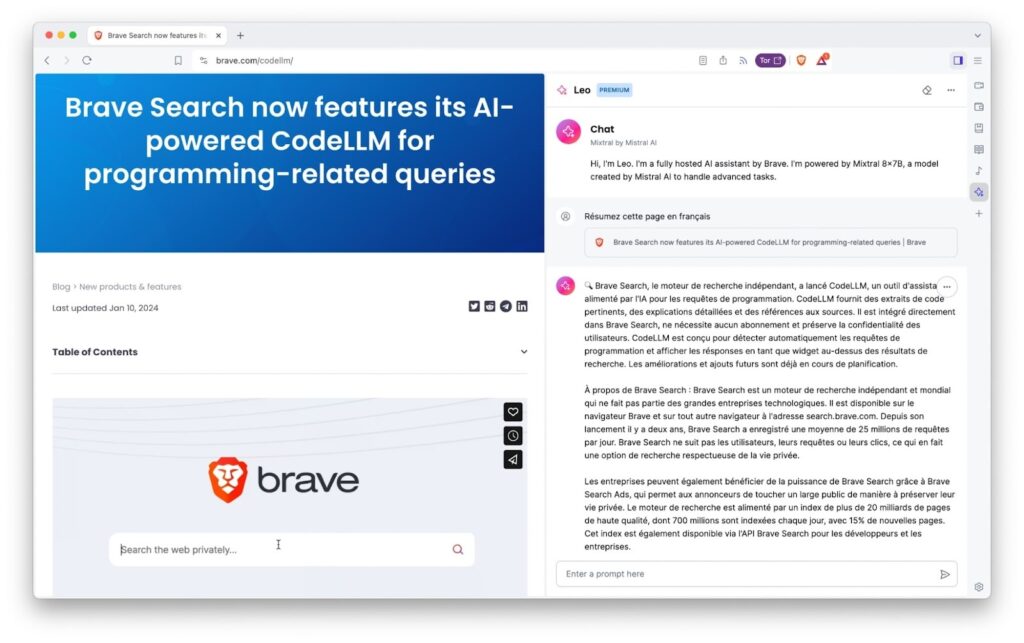
Courageous Browser is a quick, privacy-first browser with built-in AI help known as Leo AI. It’s designed to cut back monitoring, adverts, and background noise whilst you browse.
How one can set up and use it
You obtain Courageous from courageous.com and set up it like all normal browser.
To make use of Leo AI, open a webpage and click on the AI icon. You may ask for summaries, explanations, or assist understanding what you might be studying. Courageous is free to make use of. There are non-compulsory paid AI options, however they aren’t required for fundamental workflows.
This strategy pairs nicely with physicians who need the advantages of AI with out compromising belief, a priority usually addressed in discussions about AI security and compliance for medical doctors.
Actual-world use instances
- Studying articles with out intrusive adverts
- Quicker, cleaner looking
- Much less visible distraction when consuming information
- Analysis with out aggressive monitoring
- Fast summaries of studies or articles
- Cleaner workflows throughout centered work
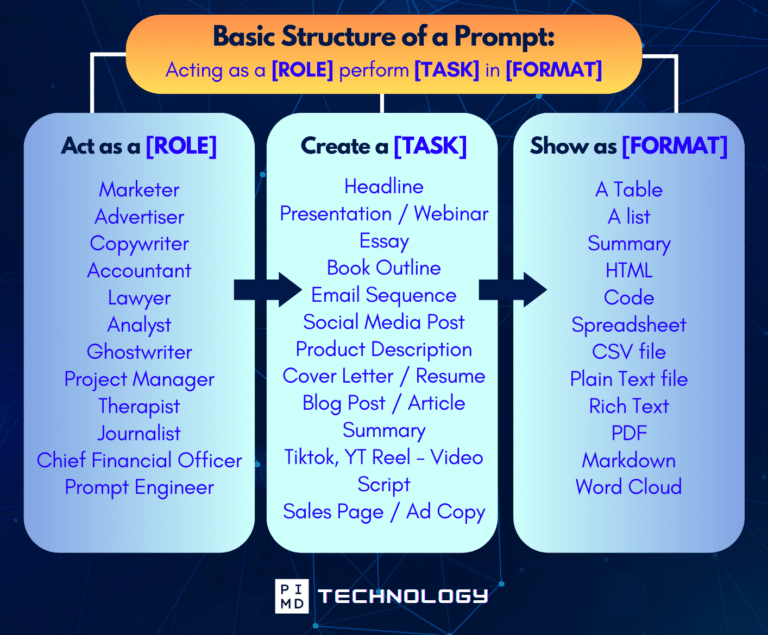
Unlock the Full Energy of ChatGPT With This Copy-and-Paste Immediate Formulation!
Obtain the Full ChatGPT Cheat Sheet! Your go-to information to writing higher, quicker prompts in seconds. Whether or not you are crafting emails, social posts, or displays, simply observe the components to get outcomes immediately.
Save time. Get readability. Create smarter.
Why Physicians Ought to Attempt AI Browsers
After a full day within the hospital, the very last thing you’d need is to waste one other hour Googling by rabbit holes simply to seek out one clear reply. You’re drained, spent, and nonetheless have 10 different issues that want doing.
That’s why I imagine small issues like this truly made a distinction.
They do take the sting off. Streamlining the noise, serving to you make sense of information quicker, and saving your focus for the stuff that basically issues.
And truthfully? That issues past simply scientific work. Whether or not you’re studying by contracts, studying a brand new funding technique, or researching one thing for the children, having a browser that thinks a little bit extra such as you does make all the pieces smoother. Over time, these small efficiencies add up, identical to the compounding impact described in the way to construct an AI assistant that helps forestall burnout.
It’s about move. The most effective instruments are those that quietly take away friction and make it easier to take motion with out burning out. And on this stage of life? I’ll take all the benefit I can get.
Let me know what you assume. As at all times, we’re at all times rooting for you right here at PIMD!
Obtain The Doctor’s Starter Information to AI – a free, easy-to-digest useful resource that walks you thru good methods to combine instruments like ChatGPT into your skilled and private life. Whether or not you are AI-curious or already experimenting, this information will prevent time, stress, and possibly even a little bit sanity.
Need extra tricks to sharpen your AI expertise? Subscribe to our publication for unique insights and sensible recommendation. You may additionally get entry to our free AI useful resource web pagefilled with AI instruments and tutorials that will help you have extra in life exterior of medication. Let’s make life simpler, one immediate at a time. Make it occur!
Disclaimer: The knowledge supplied right here relies on out there public knowledge and might not be totally correct or up-to-date. It is really helpful to contact the respective firms/people for detailed data on options, pricing, and availability. All screenshots are used underneath the rules of honest use for editorial, academic, or commentary functions. All emblems and copyrights belong to their respective house owners.
Pictures used on this article are for editorial and informational functions solely and are sourced from publicly out there product pages and promotional supplies supplied by their respective firms. Microsoft Edge with Copilot photos courtesy of Microsoft. Arc Browser photos courtesy of The Browser Firm. Courageous Browser and Leo AI photos courtesy of Courageous Software program, Inc. All product names, logos, and interface designs are emblems or registered emblems of their respective house owners. No affiliation or endorsement is implied.
If you’d like extra content material like this, be sure to subscribe to our publication to get updates on the newest developments for AI, tech, and a lot extra.
Additional Studying
https://weblog.passive-income4u.com/create-your-very-own-auto-publish-news-blog-site-and-earn-passive-income-in-just-4-easy-steps/